Flood Fill
Problem Statement:
You are given an image represented by an m x n grid of integers image, where image[i][j] represents the pixel value of the image. You are also given three integers sr, sc, and color. Your task is to perform a flood fill on the image starting from the pixel image[sr][sc].
To perform a flood fill:
- Begin with the starting pixel and change its color to
color. - Perform the same process for each pixel that is directly adjacent (pixels that share a side with the original pixel, either horizontally or vertically) and shares the same color as the starting pixel.
- Keep repeating this process by checking neighboring pixels of the updated pixels and modifying their color if it matches the original color of the starting pixel.
- The process stops when there are no more adjacent pixels of the original color to update.
Return the modified image after performing the flood fill.
Example 1:
Input: image = [[1,1,1],[1,1,0],[1,0,1]], sr = 1, sc = 1, color = 2
Output: [[2,2,2],[2,2,0],[2,0,1]]
Explanation:
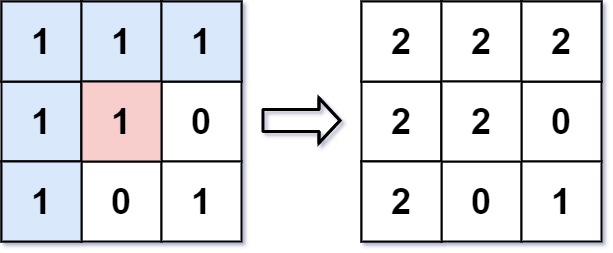
From the center of the image with position (sr, sc) = (1, 1) (i.e., the red pixel), all pixels connected by a path of the same color as the starting pixel (i.e., the blue pixels) are colored with the new color.
Note the bottom corner is not colored 2, because it is not horizontally or vertically connected to the starting pixel.
Example 2:
Input: image = [[0,0,0],[0,0,0]], sr = 0, sc = 0, color = 0
Output: [[0,0,0],[0,0,0]]
Explanation:
The starting pixel is already colored with 0, which is the same as the target color. Therefore, no changes are made to the image.
-
Example:
✅ Solution: Flood Fill Algorithm — BFS Approach (C++)
// ✅ Flood Fill Using BFS (Breadth-First Search) in C++

class Solution {
public:
    vector<vector<int>> floodFill(vector<vector<int>>& image, int sr, int sc, int color) {
        int n = image.size();
        int m = image[0].size();
        int startColor = image[sr][sc];

        if (startColor == color) return image;  // No change needed if same color already

        queue<pair<int, int>> coord;
        coord.push({sr, sc});
        image[sr][sc] = color;

        int dx[4] = {0, 0, 1, -1};
        int dy[4] = {1, -1, 0, 0};

        while (!coord.empty()) {
            int x = coord.front().first;
            int y = coord.front().second;
            coord.pop();

            for (int i = 0; i < 4; i++) {
                int nx = x + dx[i];
                int ny = y + dy[i];

                if (nx >= 0 && ny >= 0 && nx < n && ny < m && image[nx][ny] == startColor) {
                    image[nx][ny] = color;
                    coord.push({nx, ny});
                }
            }
        }

        return image;
    }
};
📝 How It Works
- Step 1: Store the initial color at
(sr, sc). - Step 2: If initial color equals new color, return immediately (avoids infinite loop).
- Step 3: Use BFS queue starting from
(sr, sc):- Change the color of each pixel that matches the starting color.
- Explore its 4-connected neighbors (up, down, left, right).
- Push neighbors into the queue if they match the starting color.
✅ Works like spreading paint: each pixel "spreads" color to its neighbors level by level.
🧩 Key Formula / Recurrence
-
BFS Processing:
for each pixel → if neighbor matches startColor → change color + enqueue -
4 Direction Movement:
dx = {0, 0, 1, -1}dy = {1, -1, 0, 0}
⏱️ Time & Space Complexity
| Metric | Value |
|---|---|
| Time | O(N × M) |
| Space | O(N × M) |
- N = Number of rows.
- M = Number of columns.
- Each cell is visited once at most.
⚠️ Edge Cases
- Start color is already equal to target color.
- Small grids (
1x1size). - Non-rectangular behavior isn’t possible in grid format (fixed rows and columns).
💡 Other Approaches
| Approach | Time Complexity | Notes |
|---|---|---|
| DFS (Recursive) | O(N × M) | Simpler but risks stack overflow on large grids. |
| BFS | O(N × M) | Safer for large grids. |
🔁 Related Problems
- Number of Islands
- Rotting Oranges (Similar BFS grid traversal)
- Surrounded Regions Problem
- Maze Solving Using BFS/DFS